Customize and Control Data Access
If you’re authenticating and authorizing access to embedded content using unified access token (UATs) or Tableau connected apps, you can control and customize the user experience based on users’ contexts.
The following customization and data access capabilities are available when UATs or connected apps are configured:
- User attributes: This customization is enabled by a combination of including user attributes in a JSON Web Token (JWT) and applying user attribute functions in embedded content, such as workbooks. By including user attributes in your embedding workflow, you can manage data access policies in the same place you manage other policies in your organization and personalize the experience for users so they only see the information that is relevant to them. For information, see User attributes.
- On-demand access for users: Enabling on-demand access, you allow your users to interact with embedded Tableau content authenticated through the UAT without needing to provision those users in your Tableau Cloud site. On-demand access removes the requirement for you to add and manage users in Tableau Cloud to support access to embedded content. For more information, see On-demand access for users.
- Dynamic group membership through assertions: You can dynamically control group membership through custom claims included in the JWT sent by the external application. For more information, see Dynamic group membership through assertions.
User attributes
What are user attributes?
User attributes are user metadata defined by your organization. User attributes can be used to determine access in a typical attribute-based access control (ABAC) authorization model. User attributes can be any aspect of the user profile, including job roles, departmental membership, management level, and so on. They might also be associated with run-time user contexts like where the user is signed in or their language preference.
By including user attributes in your embedding workflow, you can control and customize the user experience through data access and personalization.
- Data access: User attributes can be used to enforce data security policies. This ensures that users only see the information they are authorized to see.
- Personalization: By passing user attributes like location and role, your embedded content can be customized to display only the information relevant to the user accessing it, making it easier for them to find the information they need.
Enable user attributes
Summary of steps to pass user attributes
The process of enabling user attributes is summarized in the following steps.
- Enable the user attributes setting
- Configure a unified access token or connected app
- Include user attributes in the JWT
- Ensure that the content author includes user attribute functions
- Embed that the content in your external application
1. Enable the user attributes setting
For security purposes, user attributes are only validated in an authentication workflow if the user attribute setting is enabled by a site admin (on Tableau Cloud) or server admin (on Tableau Server).
Tableau Cloud
- Sign in to Tableau Cloud and click Settings > Authentication.
- Under the Control User Access in Authentication Workflows heading, select the Enable capture of user attributes in authentication workflows checkbox.
For more information about site settings, see the Site Settings Reference topic in the Tableau Cloud Help.
Tableau Server
Enabling user attributes on Tableau Server must be done programmatically using the Tableau REST API. In addition, you can enable the features.vizDataServiceClientEnable option in Tableau Services Manager (TSM) to support user attributes in published data sources.
- Sign in and authenticate to the Tableau REST API. For more information, see the Sign In method.
- Set the
attributeCaptureEnabledattribute totrueusing the Update Site method. This enables user attributes for all Tableau Server embedding workflows. - (Optional) Enable the
features.VizDataServiceClientEnableoption in TSM by doing the following:- Open a command prompt as an administrator on the initial node (where TSM is installed) of the Tableau Server cluster.
- Run the following commands:
tsm configuration set -k features.VizDataServiceClientEnable -v true
tsm pending-changes apply
For more information, see
features.VizDataServiceClientEnablein the Tableau Server Help.
2. Configure a unified access token or connected app
Unified access tokens
(Tableau Cloud only)
To configure a unified access token (UAT), you must be a cloud administrator in Tableau Cloud Manager (TCM). For more information, see Unified Access Tokens and the UAT configuration methods in the Tableau Cloud Manager REST API Help.
Connected apps
Tableau Cloud As a site admin, configure a connected app using direct trust or OAuth 2.0 trust. You can skip to the next step if you’ve already created one or more connected apps on your site.
Tableau Server As server admin, configure connected app using direct trust or OAuth 2.0 trust. You can skip to the next step if you’ve already created one or more connected apps on your server or site.
3. Include user attributes in the JWT
Make sure that the JWT contains the user attributes.
Example
Suppose you have an employee, Fred Suzuki, who is a manager located in the South region. You want to ensure that, when Fred reviews reports, he is only able to see data for the South region. In a scenario like this, you might include the Region user attribute in your JWT like in the Python example below.
import jwt
token = jwt.encode(
	{
		"iss": connectedAppClientId,
		"exp": datetime.datetime.utcnow() + datetime.timedelta(minutes=5),
		"jti": str(uuid.uuid4()),
		"aud": "tableau",
		"sub": user,
		"scp": ["tableau:views:embed", "tableau:metrics:embed"],
		"Region":["South"],
	},
		connectedAppSecretKey,
		algorithm = "HS256",
		headers = {
		'kid': connectedAppSecretId,
		'iss': connectedAppClientId
        }
  )
4. Ensure that the content author includes user attribute functions and data source filters
Ensure the content author includes the user attribute functions and related data source filters to control what data can display in the embedded content. To ensure the user attributes from the JWT are passed to Tableau, the content must contain one of the following user attribute functions:
USERATTRIBUTE('attribute_name')USERATTRIBUTEINCLUDES('attribute_name', 'expected_value')
The function that the content author uses depends on whether the user attributes are expected to return a single value or multiple values. For more information about these functions and examples of each, see User Functions in the Tableau Help.
Note: Preview of the content with these functions are not available when authoring in Tableau Desktop or in Tableau Cloud. The function will return NULL or FALSE. To ensure that the user functions work as expected, we recommend the author review the functions after embedding the content in an external application.
Example
Continuing the example introduced in Step 3. Include user attributes in the JWT above, to pass the “Region” user attribute from the JWT to a workbook, the author can include USERATTRIBUTEINCLUDES. For example, USERATTRIBUTEINCLUDES('Region', [Region]), where ‘Region’ is the user attribute and [Region] is a column in the data. Using the new calculation, the author can create a table with Manager and Sales data. When the calculation is added, the workbook returns “False” values as expected.

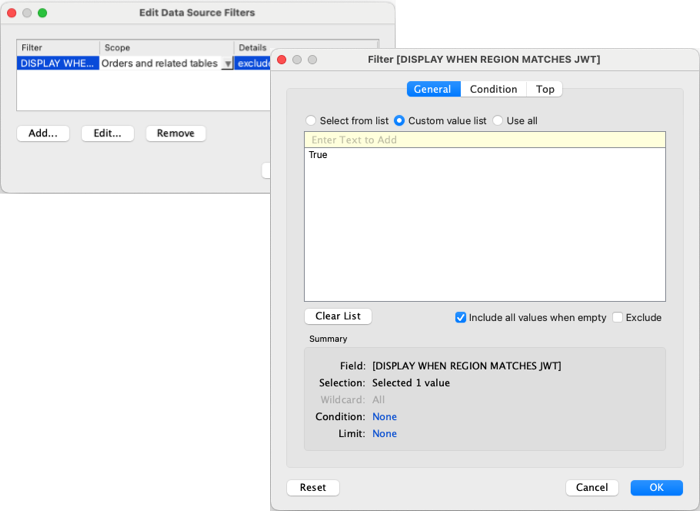
To show only the data associated with the South region in the embedded workbook, the author can create a filter and customize it to show values when the South region is “True.” When the filter is applied, the workbook becomes blank as expected because the function is returning “False” values and the filter is customized to show “True” values only.
5. Embed the content in your external application
Use the Tableau Embedding API to embed the content in your external application and ensure that you include the JWT in the <tableau-viz> web component or TableauViz object.
Example
To conclude the example from Step 4: Ensure that the content author includes user attribute functions above, after you embed the view in an external application, the Sales data in the view is customized to Fred Suzuki because his user context is the South region.

Managers from the regions represented in the workbook should see the value associated with their region. For example, Sawdie Pawthorne from the West region sees data specific to her region.

Managers whose regions are not represented in the workbook see a blank workbook.
Known issues and limitations
Blank images using the Tableau REST API
Tableau REST API requests Query Preview Image, Query Workbook Image, and Get Custom View Image produce blank images.
Limitations
Tableau Cloud
- User attribute functions in published data sources (.pds) are not supported.
- User attribute functions can’t be used in Tableau Bridge workflows.
In Tableau Server
- User attribute functions can’t be used with OIDC protocol.
On-demand access for users
(Tableau Cloud only)
You can extend access to your embedded Tableau content to more users using on-demand access. With on-demand access, you allow your users to interact with embedded Tableau content authenticated through your unified access token (UAT) or connected app without needing to provision those users in your Tableau Cloud site.
On-demand access removes the requirement for you to add and manage users in Tableau Cloud to support access to embedded content. This capability is available starting in October 2023 (Tableau 2023.3) if using Tableau connected apps or December 2025 (Tableau 2025.3) using UATs when your site is licensed with Embedded Analytics usage-based model or capacity-based model (with Tableau+ or Cloud+).
How on-demand access works
Access to embedded Tableau content using on-demand access is determined by group-level permissions either inherited by (for example, at the project-level) or directly applied to the content. Users like site admins, project owners or leaders, and content owners can assign group-level permissions to content. When users access the embedded content enabled through the on-demand access capability, Tableau validates the JWT contains the correct group membership claims before displaying the content.
Prerequisites
The following criteria must be true to enable on-demand access for embedded content:
- Site is licensed with Embedded Analytics usage-based model or capacity-based model.
- On-demand access capability is enabled for the group
- Group permissions are specified for the Tableau content
- Unified access token configured or Tableau connected app is created
- JWT includes the
https://tableau.com/odaandhttps://tableau.com/groupsclaims - Tableau content is embedded in an external application
When these criteria are met, your users can interact with embedded Tableau content enabled through on-demand access capability.
Enable on-demand access
To enable the on-demand access capability for a group, when creating or editing a group, you must select the Allow on-demand access checkbox. For more information about creating groups, see Create a Group and Add Users to It.
You can also enable this capability using the Tableau REST API. For more information, see the Create Group and Update Group methods in the Tableau REST API Help.
Capabilities when on-demand access is enabled
Users accessing embedded Tableau content have View capabilities on the content. Users have View capabilities regardless of the selected template or customized capabilities that might be configured for the group (for example, a user with a role of Viewer will never be able to download a data source even if that capability is explicitly granted to them on a specific data source).
Monitor on-demand access
If you have Tableau Cloud with Advanced Management, you can use Activity Log to monitor on-demand access usage. Events in the Activity Log that capture on-demand access includes, but not limited to access view and login. For more information about these events, see Activity Log Site Event Type Reference.
Limitations
Because on-demand access workflows enable certain users who access embedded Tableau Content to be anonymous and ephemeral to Tableau Cloud, the following capabilities are not available to users who access embedded content enabled through the on-demand access capability:
- Create custom views
- Share content using the content’s share button
- Subscribe to content for email snapshots of information
Note: Beginning in February 2024 (Tableau 2024.1), Tableau REST API requests can be made as a user with on-demand access.
Dynamic group membership through assertions
You can dynamically control group membership using custom claims included in the JWT sent by the external application when the capability’s setting is enabled. The capability is available starting in June 2024 (Tableau 2024.2) when using Tableau connected apps or December 2025 (Tableau 2025.3) if using unified access tokens.
When configured, during user authentication, the external application sends the JWT that contains two custom claims for group membership: group (https://tableau.com/groups) and group names (for example, “Group1” and “Group2”) to assert the user into. Tableau validates the JWT and then enables access to the groups and the content whose permissions depend on those groups.
For more information, see one of the following:
- For Tableau Cloud - Dynamic group membership using assertions
- For Tableau Server - Dynamic group membership using assertions