
Using Pulse Generate Insight Brief
This topic provides supplemental information about how to use the Generate insight brief(Link opens in a new window) REST API to make the most of the Enhanced Q&A (Discover) features of the Tableau AI stack. For more information about Enhanced Q&A, see Ask Questions and Discover Insights in Tableau Pulse(Link opens in a new window).
Request body
Metric group context
One of the most important components of /brief API is the metric_group_context associated with each message. This field specifies what are the metrics/definitions that Discover needs to consider for the query.
Datasource restriction
The /brief API works best when the metrics come from the same datasource. This allows the backend to apply the same filter for all the metrics to consider. Discover front-end makes sure that all the metrics in the metric_group_context shares the same datasource. Make sure you do the same when you call /brief API.
Message History
The /brief API request payload allows you to send the message history. The backend will use this and include the last few messages (up to 300 words) for the LLM to consider. You can trim the message history in the request to keep the request size manageable, but make sure the history starts with a query.
The content of metric_group_context likely changes for each response. Usually the backend will narrow down the context to what is needed to respond to the query. [The following is subject to change, but] Currently, the API backend looks at the metric_group_context for the first and last messages to determine what are the metrics to consider for the query. As you trim the message history, consider keeping the metric_group_context for the first message broader to cover the appropriate search space for the query.
Each message in the messages array contains the following fields:
role- The role of the initiator of the message. Values:ROLE_USERorROLE_ASSISTANT.action_type- The action type of the message. Value:ACTION_TYPE_ANSWER.content- The text content of the message.metric_group_context- The metrics and related objects used to set the context for the insight brief.metric_group_context_resolved- A boolean indicating if the metric group context was resolved. Setting this totruemeans that the backend will use the metrics as-is to respond to your query. Most of the time you want this set tofalseso that the backend can change the scope of the metrics (apply filters/adjust time range) to correspond to the query.
Response body
markup Markdown format
The /brief API returns a markup field containing the LLM response mostly in a Markdown format and some HTML (particularly span tag for bolded text).
Citation: (insight_id|metric_id)
The markup field contains the LLM response which includes one or more citations in it. For example:
The value is below the threshold of <span data-type=”number”>300.0K</span>, which is within the acceptable limit [[1]](41952042-7141-4886-b539-fc5e8199f4f5|dfe52942-85f4-4980-9465-0bc8e291dab9).
The citation markdown link for [[1]] contains two ids (insight_id|metric_id). You can find the insight with matching insight_id in the source_insights field in the response. The viz field contains visualization for the insight in a Vega-Lite format. Note that the insight_id is only valid in this response. I.e. A subsequent response citing the exact same insight may be associated with a different insight_id.
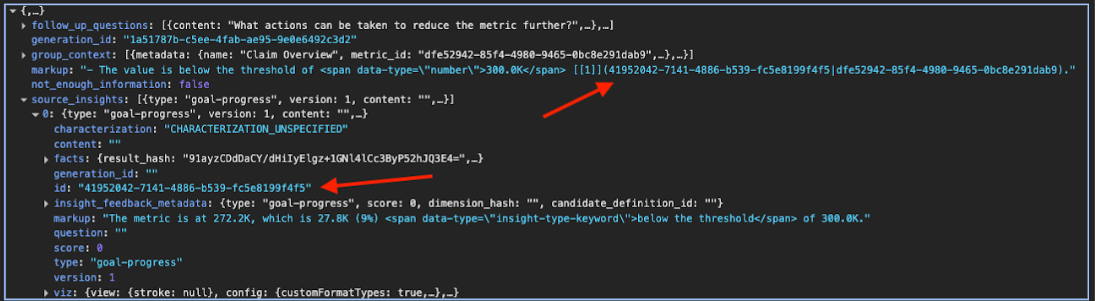
You can also provide a link to the metric with the metric_id. e.g. dfe52942-85f4-4980-9465-0bc8e291dab9 in the above example.
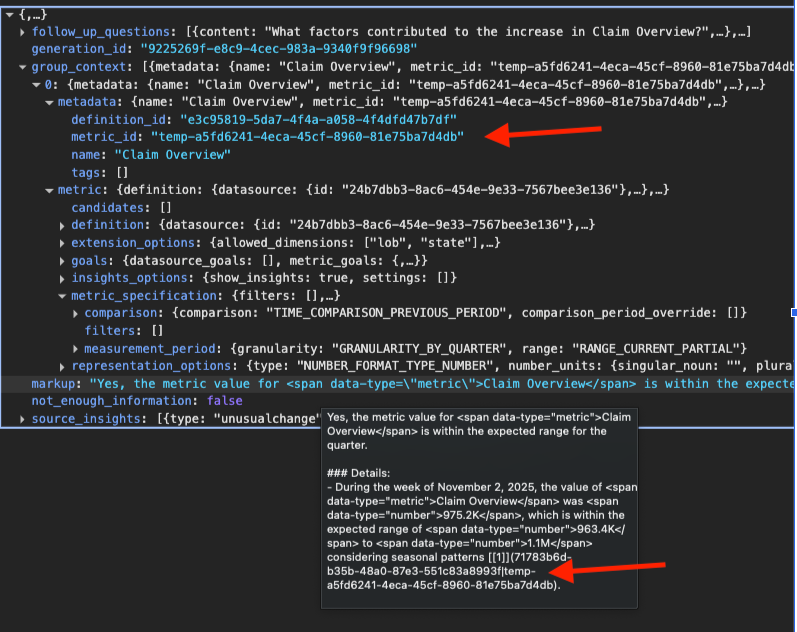
In many scenarios, the /brief API can change the scope of the metric based on the query. In that scenario, you are going to see the metric_id prefixed with temp- keyword.
To use the temp-metric_id, find the associated metric_specification from the group_context field in the response and use it with the Get or create metric API to get the actual metric_id that you can create a link for.
Group context
The group_context field contains the refined list of metrics that the /brief API backend generates insights for for the LLM to consider. The LLM response may not use all of the metrics in its response. The Pulse Discover front-end only shows the metrics that are cited in the response.
Additional response fields
The /brief API response also includes the following fields:
follow_up_questions- An array of suggested follow-up questions. Each question contains acontentfield (the question text) and ametric_group_context_resolvedfield (boolean indicating if the metric group context is resolved).generation_id- A unique identifier for this insight brief generation.not_enough_information- A boolean field. Iftrue, there is not enough information to generate an insight brief. Iffalse, there is enough information to generate an insight brief.