
FIPS Compliance in Tableau Server on Linux
This topic introduces the FIPS-compliant version of Tableau Server. FIPS (Federal Information Processing Standard) compliance was added to Tableau Server on Linux in version 2025.3. Tableau Server on Windows is not FIPS compliant.
FIPS 140-2 is a U.S. government computer security standard used to approve cryptographic modules. This compliance ensures that all cryptographic operations within Tableau Server meet rigorous security requirements, providing a more secure environment for your data.
What FIPS compliance means for you
For most users, the day-to-day experience of using Tableau Server will remain largely unchanged. The FIPS compliance is primarily an under-the-hood enhancement that strengthens the security posture of the server.
-
Enhanced Security: All data in transit and at rest, when protected by cryptographic modules, will use FIPS-validated algorithms.
-
Regulatory Adherence: FIPS compliance in Tableau Server for Linux helps organizations meet specific government and industry regulations that mandate FIPS 140-2 compliance.
-
User Impact: There is no direct user impact. You do not need to change how you publish workbooks, view dashboards, or interact with data. The security enhancements are transparent to the end-user workflow.
Installing Tableau Server in FIPS mode
Installing Tableau Server in FIPS mode means including the --enable-fips flag with the initialize-tsm script. The documentation to install and initialize Tableau Server is the same as a non-FIPS server except for the --enable-fips flag. A Tableau Server instance either is or is not in FIPS mode. Once initialize-tsm has been run for the first time for any instance, FIPS mode is set and cannot be changed unless you reinstall Tableau Server. For more information about installing Tableau Server, see Install and Initialize TSM.
To convert an instance of Tableau Server from non-FIPS to FIPS mode, see Restoring Data to a FIPS mode Tableau Server
Note: FIPS mode has not been tested and is not supported with Tableau Server in a Container.
Using Tableau Server’s command line tools with FIPS
When Tableau Server is installed in FIPS mode, part of the installation process adds a special environment variable, TABLEAU_SERVER_ENABLEFIPS=true, to the system startup scripts so that users of the system will automatically have this environment variable set for them then they log in. This ensures that when the user runs either the tsm or tabcmd CLI tools, those tools will also run in FIPS mode. While running tsm and tabcmd in FIPS mode is important for FIPS compliance, it is also necessary for correct functionality.
Note: You cannot use older versions of tsm with a server in FIPS mode.
How to determine if FIPS mode is enabled on Tableau Server
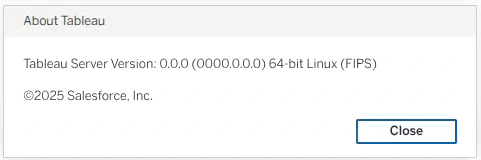
FIPS mode impacts some interactions with Tableau Server, including when you can restore a server backup to another instance, and how some database connections require for authentication. There are several methods to determine if your server is running in FIPS mode:
-
In TSM
-
Run the
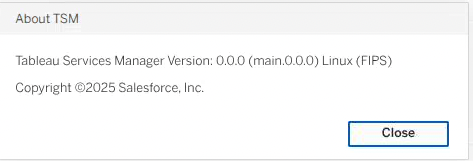
tsm versioncommand on the command line and look for "(FIPS)" at the end of the version:% tsm version Tableau Services Manager command line version 2025.3.0. (FIPS) Tableau Server version 2025.3.0. (FIPS)
-
Open the About TSM dialog from the TSM UI:
-
-
using tabcmd:
% tabcmd version
Tableau Server Command Line Utility -- 2025.3.0 (FIPS) -
opening the About Tableau dialog in Tableau Server:
Using a FIPS-enabled Linux operating system
Tableau Server in FIPS mode has been tested on RHEL 8 with FIPS enabled(Link opens in a new window). Tableau Server should run in FIPS mode on any supported Linux operating systems, but has only been tested on RHEL 8.
You do not have to have a FIPS enabled OS to run Tableau Server in FIPS mode, but for complete FIPS compliance, you likely will want to run on a FIPS-enabled OS. You are responsible for understanding and knowing how to configure your operating system to run in FIPS mode.
Restoring Data to a FIPS mode Tableau Server
In order to restore data to a FIPS mode Tableau Server, the backup must be compliant with FIPS. However, if you are running a pre-FIPS compatible Tableau Server version, then that server cannot generate a FIPS-compliant backup and you will need to upgrade that instance before creating a backup that is FIPS-compliant.
As a best practice, we strongly encourage all customers to use the Blue/Green approach for upgrading as this provides a way to fall back to your original server if you run into difficulties. For details on Blue/Green upgrades, see Using a Blue/Green approach for upgrading Tableau Server.
Upgrading a non-FIPS installation to FIPS mode
To move from a non-FIPS version of Tableau Server to a FIPS mode version:
-
Back up your non-FIPS mode Tableau Server.
This backup is a best practice for safety and can be used to restore your original Server install if something goes wrong.
-
Upgrade your non-FIPS mode Tableau Server to the version of Tableau Server that supports FIPS (2025.3.0 or later).
-
Take a backup of the upgraded server. This backup will be used to restore your data to a FIPS-enabled server instance created in the next step.
Note: The upgraded server will not be in FIPS mode, but it generates a FIPS-compliant backup because it is a version that is FIPS-aware.
-
Create a new Tableau Server instance running in FIPS mode.
-
Restore the backup data to the new FIPS- enabled instance.
Note: Once you upgrade Tableau Server to a version that supports FIPS, the backup generated by that version will be FIPS-compliant even if the Tableau Server instance isn't running in FIPS mode.
Upgrading a FIPS mode installation to non-FIPS mode
To convert from a FIPS mode installation to a non-FIPS installation, you can follow similar steps. If you do this, the ultimate non-FIPS installation must still be a FIPS-aware version (2025.3.x or later) with FIPS mode disabled.
FIPS enforcement mechanisms
The job of enforcing FIPS standards is handled by two external libraries, openssl(Link opens in a new window) and bouncycastle(Link opens in a new window). The libraries are NIST certified to guarantee FIPS compliance as long as the applications using them rely on them exclusively for cryptographic functions. Tableau Server is designed so that all cryptographic functions go through one of these two libraries.
Specifically, the Bouncycastle libraries will not read the standard Java Keystore cacerts file as it is not FIPS compliant. In its place, Tableau Server uses the Bouncycastle-specific and FIPS-compliant BCFKS keystore. The use of this keystore is mostly transparent to users except if they are adding their own certificates to the OS truststore in order to communicate securely via (m)TLS to their JDBC data sources as described in the Tableau Desktop and Web Authoring documentation(Link opens in a new window). In addition to following those steps, and after running update-ca-certificates, the user should then run the additional script in the Tableau Server install directory named update-cacerts, which will convert the contents of the OS truststore cacerts file to the FIPS-compliant cacerts.bcfks which will be created in the same directory as the OS truststore file.
An example of FIPS enforcement is demonstrated connecting via JDBC to a PostgreSQL database. The two most common errors are that the server or the database user is not configured to use scram-sha-256 password encryption(Link opens in a new window) and instead is using md5 password encryption, or when the database user's password is fewer than the Bouncycastle library mandated 112 bits (14 bytes) in length. When connecting to PostgreSQL while Tableau Server is in FIPS mode, a user may encounter one or both errors, depending on their user configuration and credentials. Errors like these are common when running software in FIPS mode and are the difference between running Tableau Server in non-FIPS mode and FIPS mode.
FIPS boundary
Running Tableau Server in FIPS mode on a FIPS-enabled OS means that the software running on the FIPS-enabled OS and the Tableau Server software running directly on that OS are FIPS-enabled and will enforce FIPS standards. However, other software will connect to that Tableau Server, including software written by Tableau and no claims are made about the FIPS compliance of that software. The same is true if the OS is not FIPS-enabled. This includes but is not limited to web browsers and Tableau Desktop.
Additionally, the FIPS standard only relates to enforcing the cryptographic algorithms in use. FIPS does not necessarily reflect the overall security posture of the software system. For example, in the above example using PostgreSQL, one option for password encryption is named "password" which means no encryption. That is, passwords are sent in the clear. This is the most insecure password transmission protocol of them all, but is technically FIPS compliant because there are no cryptographic algorithms in play. If a user configures their postgres database to accept passwords in the clear, a Tableau Server in FIPS mode will connect without errors. Users are required to be aware of the security settings they are using. Running Tableau Server in FIPS mode only guarantees that the cryptographic algorithms in use conform to the FIPS standard.